
Solution
Cloud Migration Solutions

Cloud Migration System
By providing the ability to launch and scale environments on-demand, cloud platforms have allowed organizations to iterate faster than ever before. Before the benefits of the cloud can be reaped, however, there are some challenges that need to be addressed. To effectively migrate to the cloud, organizations need to understand how to identify and meet their responsibilities in the cloud, how to manage environments across on-premises and cloud platforms, how to modernize their applications to take advantage of cloud resources, and how to maintain visibility into their entire estate as their environments grow.
While significant, these challenges are not insurmountable. The Progress® Chef® platform enables you to define configurations and requirements as platform-agnostic code, ensuring you have the ability to quickly and consistently deploy your solutions on-prem or in the cloud without having to re-invent your processes for each.
Applying this practice of Continuous Automation helps your organization move workflows to the cloud quickly, efficiently and safely. As a result, you can continue to innovate at the velocity your customers demand.
Successfully Migrate to the Cloud with Chef and AWS
Start by Understanding Cloud Responsibilities
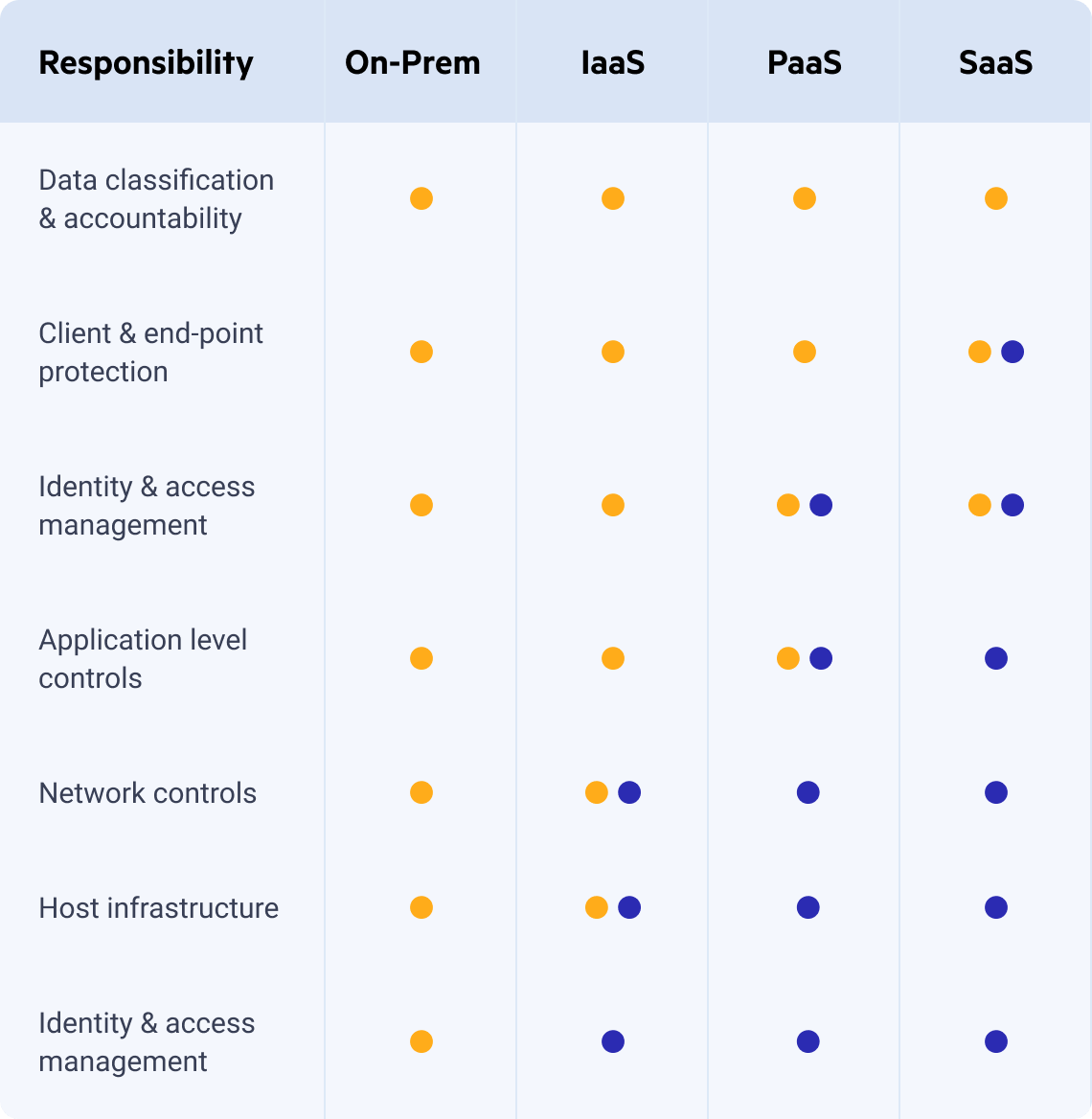
One advantage of migrating workloads to the cloud is the ability to offload some operational responsibilities to your cloud vendor. Even so, it can be difficult early on to determine to exactly what extent these tasks no longer need to be managed directly. Thankfully, cloud providers illustrate this with the Shared Responsibility Model, which defines where their responsibilities end, and yours begin.
In a cloud environment, you continue to play an important role in helping keep the instances you create updated and configuring your applications more securely. Meanwhile, cloud providers manage areas such as datacenter access controls and core infrastructure operations. They also offer tools that support tasks ranging from network design to shared storage, with responsibility typically shared depending on the specific service model. While you no longer need to provision or maintain specialized hardware, you are still responsible for working to configure your cloud provider's services in ways that strengthen your overall security posture.
Chef helps you to meet your responsibilities in your data center and in the cloud alike. With Chef, you can define your compliance as code, enabling continuous evaluation of your environments and providing up-to-date insight into everything from system patching to software vulnerabilities to formal regulatory compliance. Chef has built-in cloud resources that allow you to validate your cloud services with the same rigor as your are metal systems.
Table taken from Microsoft’s What Does Shared Responsibility in the Cloud Mean? blog
Configuration
At a high level, configuring a virtual instance in the cloud is not significantly different from configuring a bare metal or virtual server in a datacenter. Why then do we often maintain completely separate deployment scripts and procedures between our environments? The short answer is that manual processes and traditional scripting languages aren’t flexible enough to easily adapt to different platforms, and as organizations migrate to the cloud, this problem can effectively double their operational overhead with duplicated efforts.
The Chef solution is a configuration management tool that allows you to define your infrastructure as code. Chef code is platform-agnostic by design and can be easily extended to support multiple environments within a single codebase. When the Chef solution runs on your systems, it collects profiling information to inform its execution. This includes everything from resource availability (e.g. how much memory does my server have?) to cloud-specific data (e.g. Is this instance deployed to Amazon EC2?). Having this data at its disposal allows the Chef solution to take conditional action based on what it discovers. This allows you to apply a consistent configuration across environments and cloud providers, and dynamically address any differences between them.
Modernizing Your Applications
As your organization migrates to the cloud, you have an opportunity to further optimize your deployments by modernizing your applications to take advantage of the services and deployment paradigms cloud platforms offer. This can be a daunting task, as each cloud-native Software as a Service (SaaS) solution and container platform represents new technologies your teams need to learn to be effective. What’s more, some legacy applications can be difficult to modify, and can be difficult to migrate effectively.
Augment Your Migration with Chef Automate
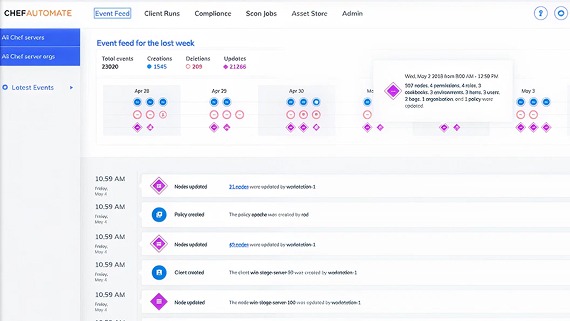
The key factor that drives organizations to adopt cloud platforms is the ability to scale their environments on-demand. As your estate grows, it becomes vitally important that you maintain visibility into how those environments evolve. Chef Automate provides not only a unified window into every system you manage with the Chef platform, but provides filterable real-time and historical data for configuration changes and compliance scans, helping you understand what's happening in your environments.
Chef, InSpec and Habitat give you everything you need to automate your infrastructure, compliance and applications. Chef Automate augments their capabilities by providing:
In-Depth Visualizations
Event Feed
- Discover every change that's been made to your Chef environment, and how many systems were impacted.
Client Runs
- Full, filterable history of every configuration change made by the Chef platform on every system you manage.
Scan Jobs
- Agentless scans of servers and cloud APIs, providing you the ability to evaluate security and compliance anywhere.
Compliance
- Weighted Compliance reports and aggregated status views provide confidence in your audits.
- A built-in library of security profiles, including the Center for Internet Security's (CIS) benchmarks and Department of Defence's Security Technical Implementation Guides (DISA STIGs), and an asset store for your homegrown profiles.